Make your DN-X1700 work with modern Macs
Patch your mixer's firmware so USB audio and MIDI work with the built-in macOS driver: 8 in / 8 out, 24-bit, at 44.1, 48 or 96 kHz. It takes a few clicks, right here in your browser.
Have a DN-X1600? There is a version for the DN-X1600, confirmed working by one owner.
Have a DN-X600? There is a version for the DN-X600, with a built-in flasher that works from Chrome or Edge on a Mac or Windows PC. Flashed on a real unit by one owner.
New and optional: Filter Control, which adds resonance, gate and range settings for the Parameters filter to the Utility menu. You choose it in step 3; the USB fix alone stays the default.
Flashing firmware can permanently destroy your mixer
You do this at your own risk. This project is provided as is, without warranty, and its author accepts no responsibility for bricked mixers or any other damage.
- The update erases the whole flash chip. If power is lost during the ~30 second write, the mixer won't start again and only an external flash programmer can recover it.
- Your settings and presets will be reset to factory defaults. Write them down or photograph them first.
- Tested on one unit, with macOS 27 on Apple Silicon and with Windows (also reported to work with ASIO4ALL). Read the full README.
-
Get Denon's official firmware
Download Denon's v2.000 firmware, a small zip file, straight from Denon's own server.
You don't need to unzip it. This page can't fetch it for you because Denon's server doesn't allow that.
-
Add the file
Drop the firmware file hereor click to choose
firmware-dnx1700-v2000.zip(orX1700FW.BIN)·
-
Download the patched firmware
Waiting for your firmware file in step 2.
Filter Control: new rows in Utility → Parameters Filter Setting- LPF Reso and HPF Reso: resonance of the low-pass and the high-pass side, 0 to 100 %. Defaults 28 % and 22 %. Denon's stock is 52 % on both sides, so the defaults make the filter peak less at the cutoff.
- HPF Gate: where the high-pass resonance starts, Off or 100 to 1000 Hz (default 400 Hz; Denon's stock is also about 400 Hz). Below it the high-pass has no resonance.
- HPF Range: how fast the high-pass opens up. Its cutoff always runs from 20 Hz (knob just right of centre) to 20 kHz (knob fully right); this setting picks the cutoff at the halfway point of that travel, from 150 Hz to 2.5 kHz. Lower values keep more of the knob in the bass, higher values reach the mids sooner. Default 20-600: 600 Hz at the halfway point. Stock is Denon's original curve: 60 Hz at the start, about 1.1 kHz at the halfway point, 20 kHz at the end.
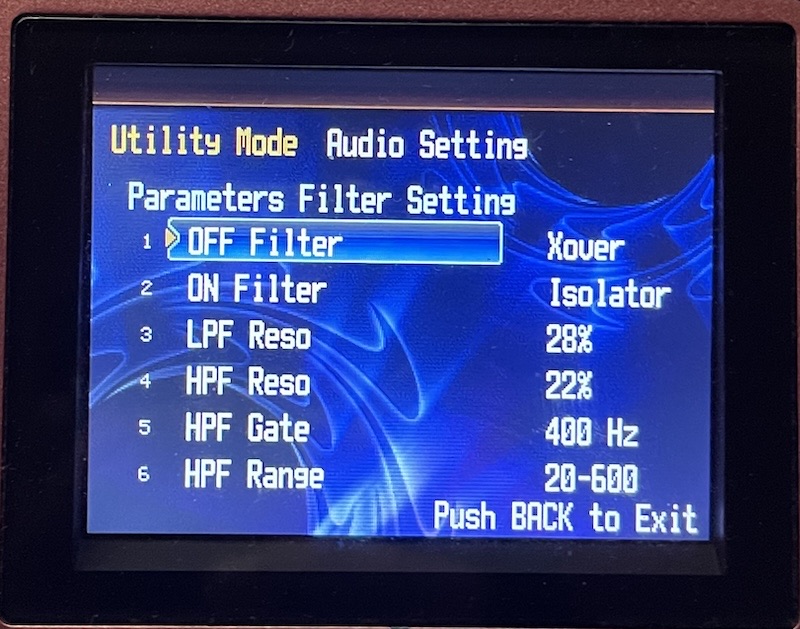
Values are saved with your settings (and in Preset Export/Import) and apply when you leave Utility and move the Parameter knob. Tested by one owner on one unit. It adds a small program that runs in RAM while the mixer is on; nothing in Denon's DSP is changed. Version UP Mode is unaffected, so you can always flash the USB-only version back. Details.
Saved as X1700FW.BIN. Keep that exact name, and copy it to the root of your USB stick in the next step.SHA-256:What was changed ()
Offset Was Now Why -
Flash it with Denon's updater
- Copy
X1700FW.BINto the root of a FAT32 USB stick (MBR partition table; a small stick is safest). Keep the name exactly as it is. - Mixer off. Plug the stick into the rear USB-A port.
- Hold MIC2 and DUCKING, switch the mixer on, and keep holding until the display says Version UP Mode.
- Press Master EFX INS 1. The display shows Version UP execute? and Ver.2000 >>> Ver.2000 (the version number doesn't change). To cancel safely, switch the mixer off here: nothing has been written yet.
- Press Master EFX INS 2. Don't touch anything until the display says Version UP complete! Shut the power OFF (about 30 seconds). Use stable mains power.
- Switch the mixer off and on again, then re-enter your settings.
Then, set it up for the Mac In the Utility menu, System Setting: set PC/MAC to MAC, USB mode to USB B, and pick the sampling frequency (44.1, 48 or 96 kHz). Power-cycle the mixer, and do so again every time you change PC/MAC or the sample rate. macOS follows the mixer's rate by itself.If something goes wrong
If an error code appears on the display, write it down and don't switch the mixer off straight away: the updater retries by itself. To go back to the original firmware, flash Denon's original
X1700FW.BINthe same way. If the mixer shows nothing at power-up after an update, the flash chip needs reprogramming with an external programmer; see the README.Did it work?
This tool is free and made in spare time. If it saved you a headache, a coffee helps keep it maintained.
Buy me a coffeeTell me how it went: a confirmation from another owner helps everyone.